 Terriloom
Issue tracking with your AI
Track the work. Ship it with AI.
One place for your items, whether you work alone or with a few people.
Terriloom
One place for your items, whether you work alone or with a few people.

Spot a bug, think of an improvement or find something that needs investigating? Ask Claude to log it in Terriloom while you carry on working. When you're ready, return to your project and organise what needs doing.
You, in Claude
Log this as a bug in Larkpine App: the date picker closes when I tap a time on iPhone. I'll look at it later.
Claude
Added LP-041 to Larkpine App: Date picker closes when you tap a time on iPhone. Bug, P1, Open.
You, later that day
Show me the issues and tasks I've logged today.
Claude
3 items so far: Investigate caching the class list query (Task), Let people save a report as a template (New Feature), and Date picker closes when you tap a time on iPhone (Bug, P1).
1 · Example: ask Claude, then carry on
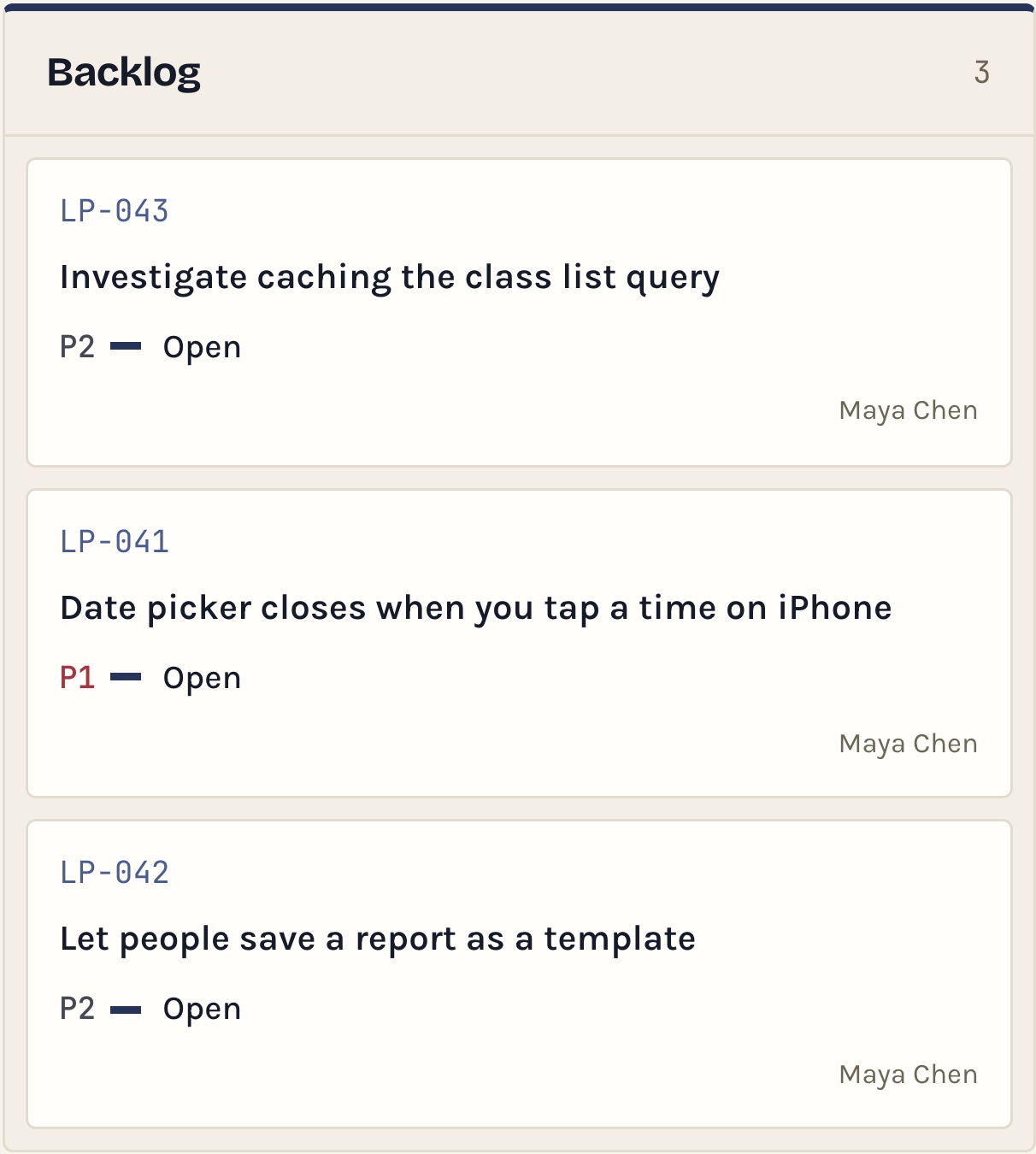
2 · It is waiting in the project's Backlog
Also ask "What is due this week?", "Which items are blocked?" or "What did the team close yesterday?", by voice on your phone too. Add Terriloom to Claude on the web, the desktop app or your phone; each person sees only what they could see in Terriloom.
Connect Claude Code from Settings in a few minutes.
Create a key in Settings and add it to your project with one short setup.
Type the requirement yourself, or tell your AI what you need and it writes the item for you: title, requirement, priority and date.
It reads the item, changes your code, then writes on the item what it did: plan, files changed, tests run.
Read only, create and update, or everything. Terriloom starts on create and update, so the AI can work an item but not close it. Every action is recorded.
Your code stays on your computer. Terriloom receives only what the AI writes on the item.
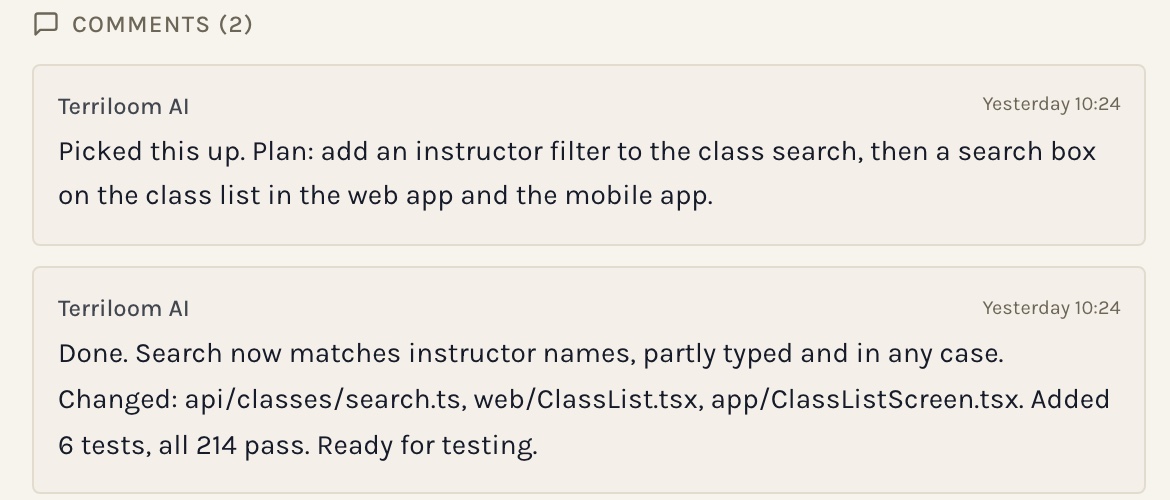
The AI's own comments on item LP-023
Two kinds of project, in one place.
Bugs, tasks, change requests and new features, each with a priority. A board from Backlog to testing, and a Ship Log of what went out.
Tasks and ideas for a thesis, a side project or your own plans. Kept simple: a list, a calendar and a Done Log of what you finished.
Every item in one place. A list for detail, a board for flow, a calendar of what is due.
The calendar shows who is free and who is away each day. Assign to shows each person's week before you pick.
Discuss an item with @mentions or message the team directly. Decisions stay on the item they belong to.
Closed items grouped into a monthly summary of what shipped, ready to copy and send.
One row per person: output, turnaround and ageing work, with a link through to their items.
Paste a screenshot into an item and mark the problem with a pen, an arrow or a box.
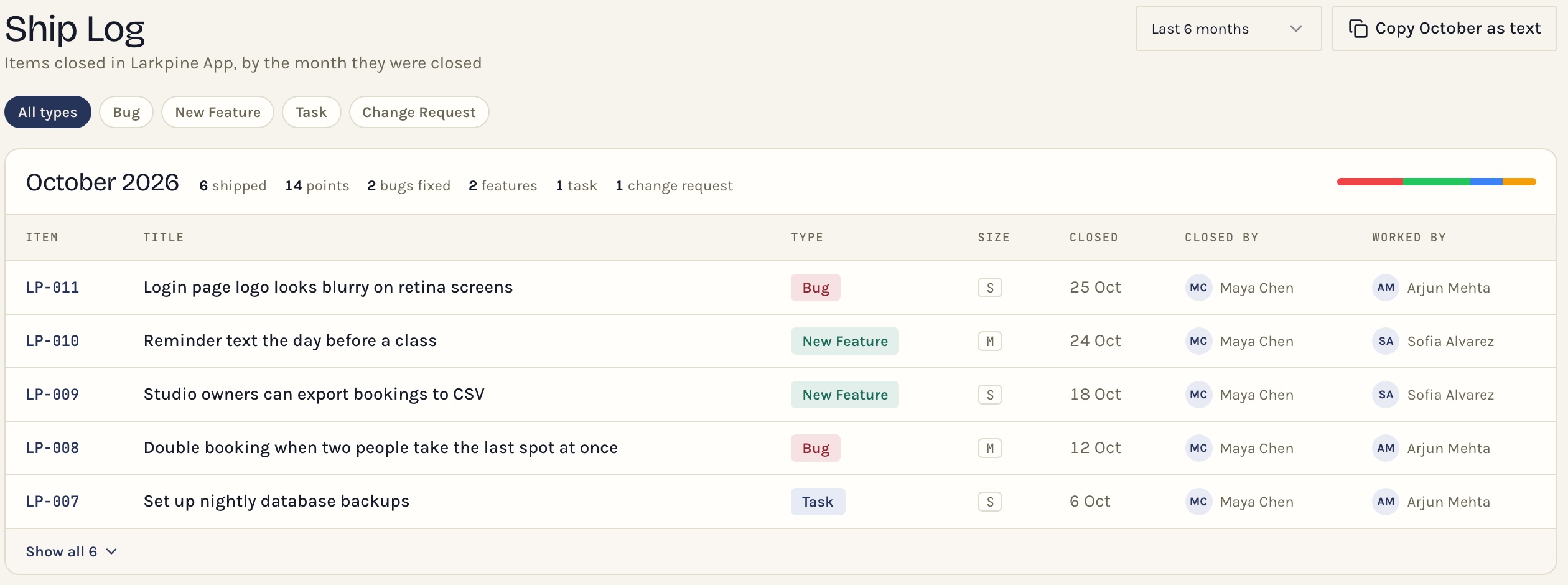
Ship Log · the month's closed items, copied as text in one click
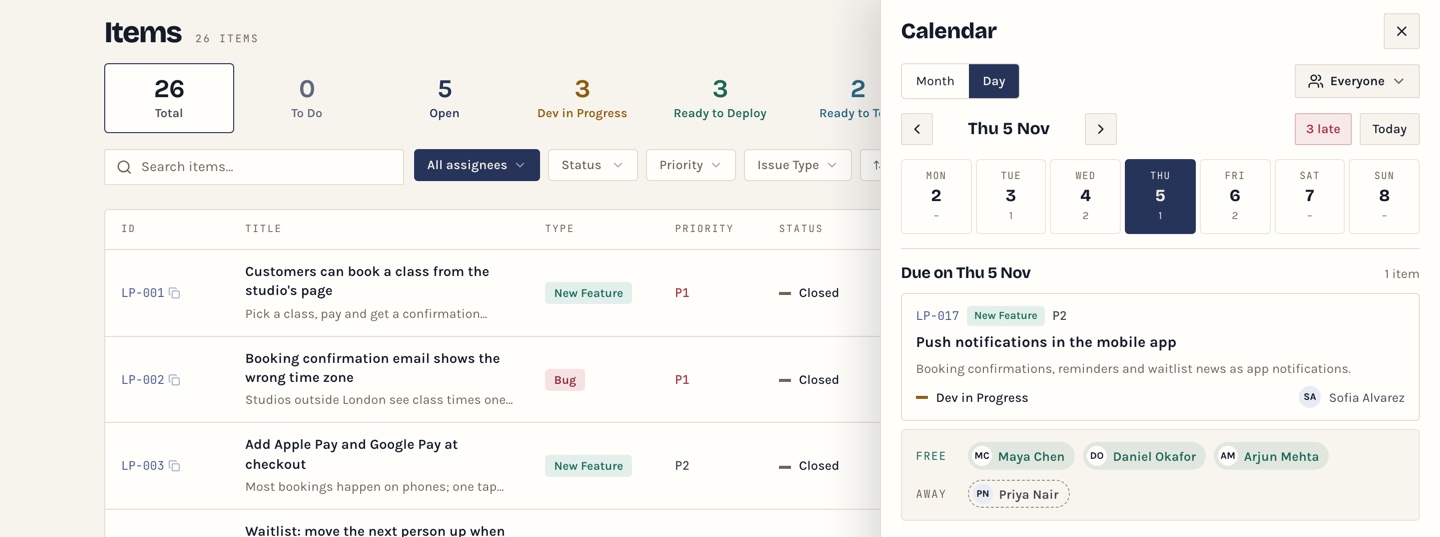
Calendar · one day: what is due, who is free, who is away
Your data is private to your team, hosted in the EU, never sold or used to train AI, and yours to export or delete at any time. Connected AI tools work under your own account. Full details are in the Privacy Policy.
Yes. You pay once and the workspace is yours to keep. There is no subscription, nothing renews and there is no charge per person.
Claude Code is what we build and test with. It connects from Settings with a key and a short instruction file, in a few minutes. Claude on the web, the desktop app and your phone connects as a connector. Other coding agents that run in your terminal should work the same way.
No. The AI runs on your own computer, in your own account. Terriloom receives only what it writes on the item: comments, status and progress.
Only within the access level you choose: read only, create and update, or everything. Terriloom starts on create and update, so the AI can work on an item but not close it. People who connect Claude choose their own permissions within that. Every action is recorded on the item.
Not yet. You can add items by hand, or connect Claude, give it your list and ask it to add them.
Only open items. Closed items never count, so your history is not capped. If you reach the limit nothing is deleted; close finished items to make room. The trial includes 100 open items. Files sent in chat are removed 90 days after they were sent; the message stays.
Your workspace holds your team, roles, settings and AI connection. Inside it, each project is one piece of work with its own type, people, list, calendar and attachments, and a board for software projects. People see only the projects they are added to; admins see all of them. Two projects are included, in the trial too, and each extra project is £19, paid once.
Two. Software projects are for bugs, requirements, development tasks, improvements and technical investigations, through to release. Personal projects are for your own tasks, plans, activities and ongoing projects, kept in one place. You choose the type when you create a project.
Your workspace is locked, not deleted. Pay at any time and everything is restored as you left it.
The trial lets you use every feature before paying. Once a payment has been made it cannot be refunded.
You would hear from us well in advance, as soon as we knew, and export would stay open the whole time so you could take everything with you. Export is in Settings today, at any time, for any reason.
A question before you start, something that does not work, or an idea for what Terriloom should do next. Write to us and a person reads it and replies by email.